Data loss prevention (DLP) is a set of checks that finds sensitive data and stops it leaving your control. For Google Drive and OneDrive, DLP finds sensitive files in your cloud storage and spots when they are shared too widely. For example, a spreadsheet of customer card numbers shared with "anyone with the link", or a contract sent to someone's personal Gmail. Good DLP alerts you, and lets you remove the risky share before the data leaks.
This guide explains how cloud file leaks happen, what DLP checks for, and the steps a small business can take today.
In security, data loss usually means data leaving your control, not just files being deleted. It can happen by accident or on purpose. Common examples:
A staff member shares a folder with "anyone with the link" to make life easy.
A file is shared with a supplier and never un-shared when the project ends.
An employee copies client files to a personal account before leaving.
A third-party app is given access to all of Drive or OneDrive, and nobody remembers it.
In small businesses, most leaks are mistakes, not crime. But the effect is the same. Personal data, such as customer names, ID numbers or health details, can end up in the wrong hands. Under data protection laws such as UK GDPR, that can lead to reporting duties and loss of trust.
DLP tools usually do three things.
DLP scans files for patterns that look like sensitive data. Examples:
Payment card numbers
National ID, passport or tax numbers
Bank account details
Health information
Words you choose, such as "confidential" or a project code name
Each match can get a sensitivity level (for example low, medium or high), so you know what to fix first.
DLP checks who can see each file. It looks for:
Files shared publicly ("anyone with the link")
Files shared outside your company
Files shared to personal email addresses
Large or unusual downloads of confidential files
When a sensitive file is exposed, DLP raises an alert. Depending on the tool, it can warn the user, block the share, or let an admin revoke (remove) access.
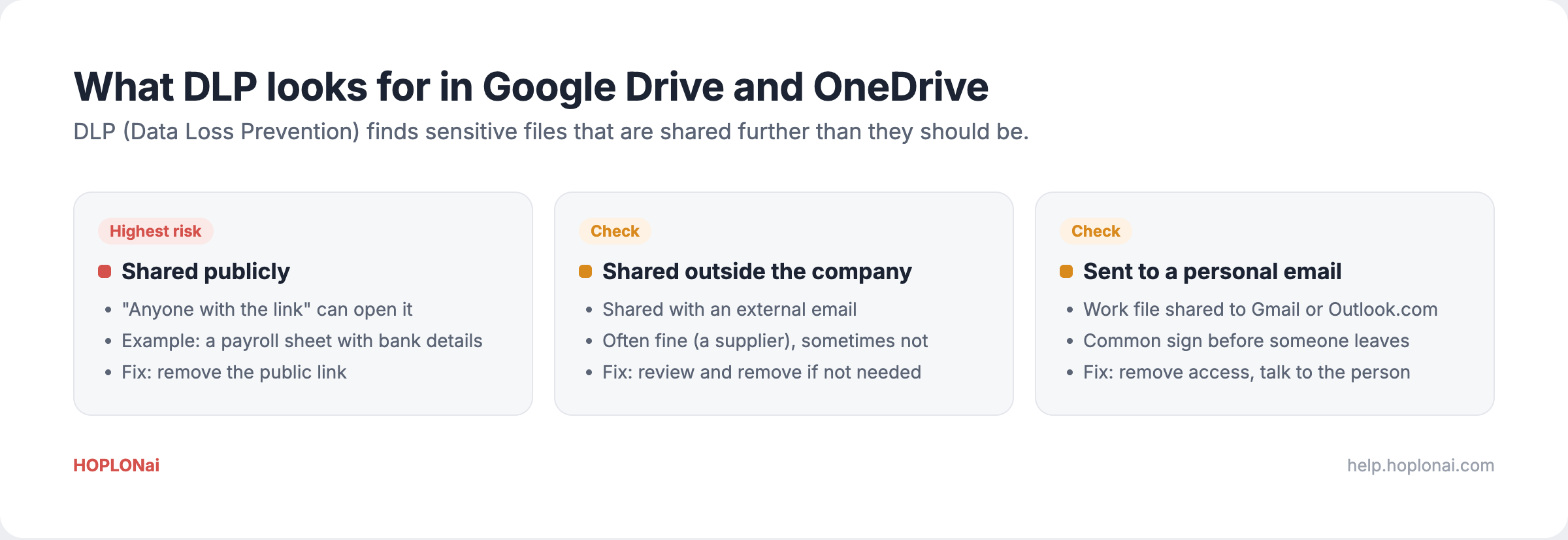
Both Google Workspace and Microsoft 365 have their own DLP features, but they depend on your plan.
Google Workspace: Google's DLP for Drive is available on some editions only, mainly Enterprise, Frontline and Education plans. Many small businesses on Business Starter or Business Standard do not have it. Check Google's admin help for your edition.
Microsoft 365: Microsoft Purview DLP can cover OneDrive, SharePoint, Exchange and Teams. What you can use depends on your licence. Check Microsoft's licensing guidance.
Built-in DLP can also take time to set up well. You need to write rules, test them and tune them so they do not block normal work.
You do not know how many files are shared publicly today.
Staff share files with clients, suppliers or freelancers.
You store customer personal data, financial data or health data in Drive or OneDrive.
People have left the company and still own files.
Customers or auditors ask how you protect data (for example for ISO 27001 or SOC 2).
Find public links. List every file shared with "anyone with the link". Remove the ones that are not needed.
Review external shares. Check files shared outside your domain, starting with sensitive ones.
Set safer defaults. In your admin console, limit or warn on sharing outside the company.
Turn on MFA for every account. Stolen passwords are a common way into cloud storage.
Review connected apps. Remove third-party apps that have broad access and are no longer used.
Plan for leavers. Transfer file ownership and remove access on the person's last day.
Agree a simple data rule. Tell staff which data is sensitive and where it may be stored and shared.
Monitor all the time, not once a year. Sharing changes every day.
Data loss prevention means finding sensitive data, such as customer details or card numbers, and stopping it leaving your control. In Google Drive and OneDrive, that mostly means spotting sensitive files that are shared publicly, outside your company, or to personal email addresses.
Yes, on some Google Workspace editions. Google lists the supported editions in its admin help. Many smaller business plans do not include it, so check your edition first.
Microsoft Purview DLP can protect OneDrive, depending on your Microsoft 365 licence. It needs policies to be set up and tested.
No. Small businesses share files with clients and suppliers every day. A single public link to a customer list is enough to cause a data breach.
DLP scans file content to find sensitive patterns. Choose a provider you trust, check its data handling, and give access with an admin account you control.
Find and remove public links to sensitive files. It is the fastest risk to reduce.
HOPLONai's Cloud DLP module connects to Google Workspace and Microsoft 365 with an admin account. It scans files in Google Drive and OneDrive and shows:
Files shared publicly, with the option to revoke public access
Sensitive files shared externally and files shared to personal email addresses
Confidential files downloaded, and by whom
The top data patterns found, with sensitivity levels
Users with the most policy violations
Third-party apps connected to your organisation
MFA status per user, sign-in logs and file activity
Cloud DLP is included in every HOPLONai package, including the free-forever Freemium package.
Learn more:
