You cannot stop every phishing email, but you can stop most of them and limit the harm from the rest. The best approach uses layers: filter bad emails before they arrive, make your domain hard to fake, protect accounts with multi-factor authentication, and train staff to spot and report what gets through. This guide shows a small business how to prevent phishing attacks, one layer at a time.
Phishing is a fake message that tries to trick someone into clicking a link, opening a file, sharing a password or sending money. It usually looks like it comes from someone you trust: a supplier, a bank, Microsoft, Google, or your own boss.
Common types you will see:
Credential phishing – a link to a fake login page that steals passwords.
Malware attachments – a file (invoice, CV, "scanned document") that installs harmful software.
Business email compromise (BEC) – an email that pretends to be a manager or supplier and asks for a payment or bank detail change. There is often no link or file at all, so filters find it harder to catch.
Spear phishing – a message written for one person, using details from your website or social media.
Small businesses are a common target. They often have fewer controls, and one person may handle both email and payments.
Many businesses rely only on "be careful" reminders. That does not work on its own. The UK's National Cyber Security Centre (NCSC) says expecting staff to spot every phishing email is not realistic. Good phishing looks real. Staff are busy.
So treat phishing like a chain. Break it at as many points as you can.
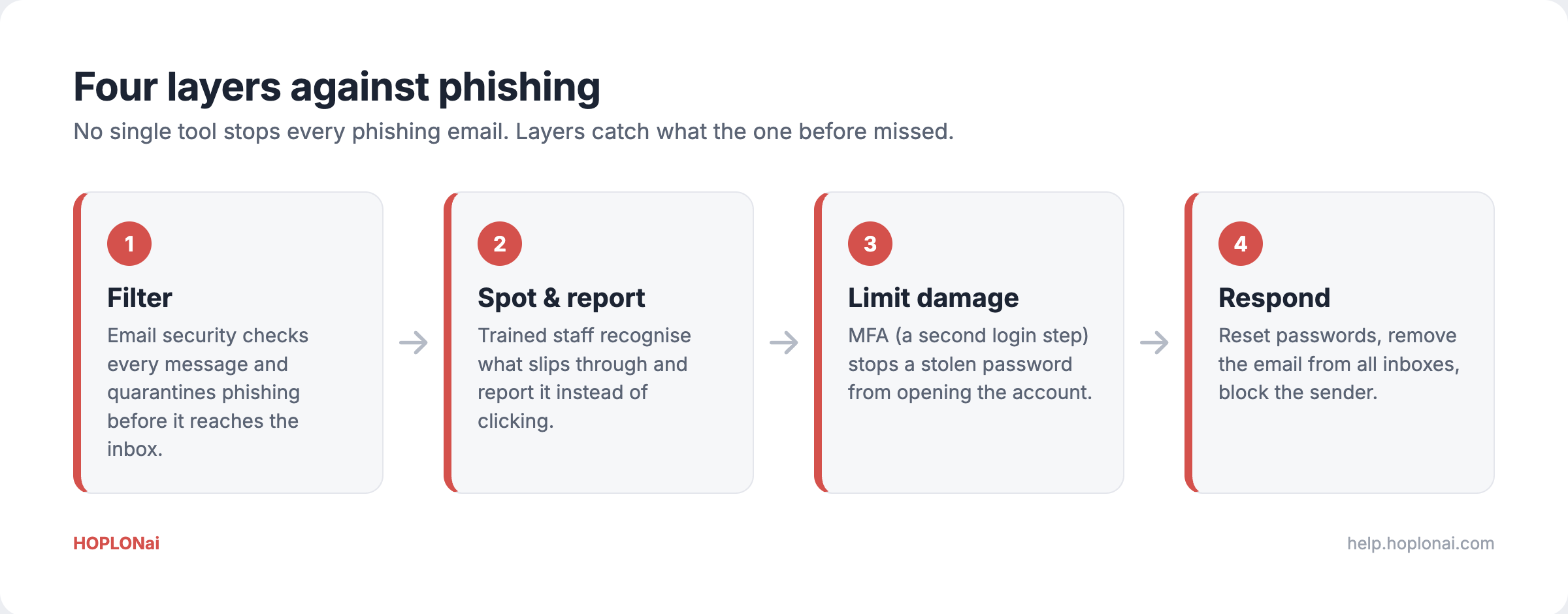
Turn on the best spam and phishing filter your email provider offers. Microsoft 365 and Google Workspace both include filtering. A dedicated email security tool adds checks such as:
Detecting lookalike sender names and domains
Scanning links and attachments
Spotting impersonation of your senior staff (often called VIPs)
Attackers love sending emails that look like they come from your domain. Three DNS records help stop this:
SPF – lists the servers allowed to send email for your domain.
DKIM – adds a digital signature, so receivers can check the email was not changed.
DMARC – tells receivers what to do with email that fails these checks, and sends you reports.
Read our guide: SPF, DKIM and DMARC explained simply
Attackers use staff names, job titles and email formats from your website and social media. Think about what you really need to publish.
Show staff what to look for:
Urgent or threatening tone ("pay today or the account closes")
A request to change bank details or buy gift cards
A sender address that is slightly wrong (for example rn instead of m)
Links where the real web address does not match the text
Unexpected attachments, especially ones that ask you to "enable content"
A phishing simulation is a safe, fake phishing email sent to your own staff. It shows who clicks, so you can give them short, focused training. Run them regularly, not once a year.
Give staff one simple way to report a suspicious email, such as a "Report" button or one shared address. Thank people who report, even if it turns out to be safe. If staff fear blame, they hide mistakes, and you find out too late.
Make it a rule: any new payee or change of bank details must be confirmed by phone, using a number you already have. Never use the number in the email. This one rule stops most BEC fraud.
Someone will click one day. Plan for it.
Turn on multi-factor authentication (MFA) for email and key apps. MFA means a second check, such as an app prompt, on top of the password. A stolen password alone is then much less useful.
Keep devices and browsers updated, so harmful files and websites have fewer weaknesses to use.
Use endpoint protection such as EDR on laptops, to catch malware that gets through.
Limit admin rights. Staff should not use admin accounts for daily work.
Use a password manager, so staff do not reuse passwords.
Write a short plan for "someone clicked". Include:
Reset the user's password and sign them out of all sessions.
Check their mailbox for new forwarding rules (attackers add these to read your mail).
Scan their device.
Tell your bank at once if money was sent.
Warn other staff if the same email went to many people.
Email filtering turned on at the highest sensible level
SPF, DKIM and DMARC published for every domain you send from
MFA turned on for every email account
Rule: confirm bank detail changes by phone
One simple way for staff to report suspicious emails
Short training for all staff, repeated through the year
Regular phishing simulations
Written steps for what to do after a click
Use four layers. Filter email and publish SPF, DKIM and DMARC. Train staff and make reporting easy. Turn on MFA and limit admin rights. Have a written plan for when someone clicks.
No. Filters catch most, but some will always get through. That is why MFA, training and a response plan matter.
Both include useful built-in filtering. Many businesses add a dedicated email security tool for stronger detection of impersonation and BEC.
Report it straight away, without fear of blame. Then change the password, check the device, and follow your response steps.
Regularly through the year works better than one big test. Short, frequent training keeps the topic fresh.
Report inside your business first. In the UK, you can also forward suspicious emails to the NCSC's Suspicious Email Reporting Service at [email protected].
HOPLONai covers several of these layers in one platform:
Email Security scans incoming mail for Microsoft 365 and Google Workspace and blocks phishing, BEC and malware. It shows your most targeted users and the SPF, DKIM and DMARC status for your domains. Admins can release a blocked email that turns out to be safe. Email Security is in the Premium package.
Human Risk runs security awareness training, phishing simulations and dark web breach monitoring, and gives each user a risk score. Human Risk is in the Starter package and above.
Learn more:
