EDR (endpoint detection and response) is security software that watches your laptops, desktops and servers all the time, spots suspicious behaviour, and helps you stop an attack on that device. Antivirus looks for known bad files. EDR also looks at what programs do, so it can catch new attacks that antivirus misses. Most small businesses that store customer data, take payments or rely on staff laptops will benefit from it.
This guide explains what EDR does, how it differs from antivirus, and how to decide if your business needs it.
An endpoint is any device that connects to your business network or accounts. That includes:
Staff laptops and desktops
Servers (in your office or in the cloud)
Sometimes phones and tablets
Each endpoint is a door into your business. If an attacker gets onto one laptop, they can often reach email, shared files and payment systems from there.
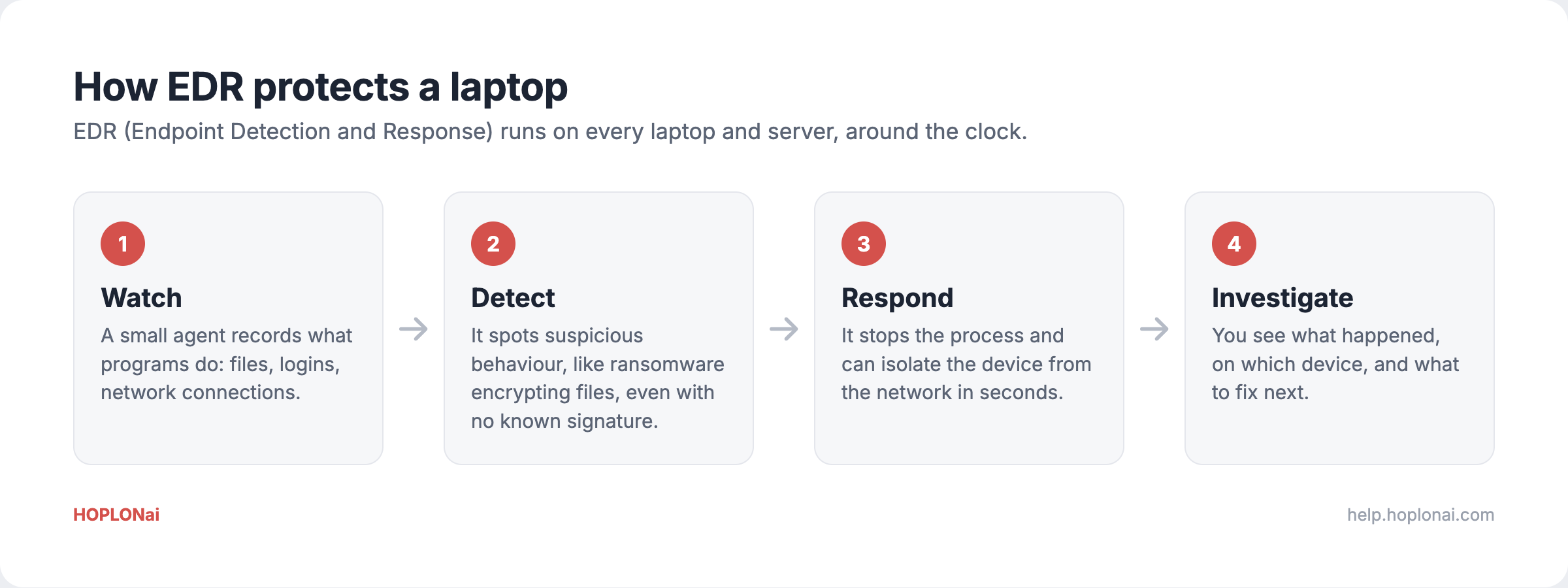
EDR works in four simple steps.
A small program called an agent runs on each device. It records activity such as programs starting, files changing and network connections. It sends this activity to a central console.
The EDR looks for patterns that match attacks. For example, a Word file that suddenly launches a hidden script, or a program that starts encrypting hundreds of files in a minute. Encrypting files fast is a typical sign of ransomware (malware that locks your files and demands payment).
When EDR finds a threat, it can act. Common actions are:
Kill the harmful process
Quarantine (lock away) the bad file
Isolate the device from the network, so the attack cannot spread
Some actions happen automatically. Others need a person to approve them.
EDR keeps a timeline of what happened on the device. This helps you answer key questions: How did the attacker get in? Which files did they touch? Are other devices affected?
Feature | Traditional antivirus | EDR |
|---|---|---|
How it finds threats | Matches files against a list of known malware | Watches behaviour, plus known malware lists |
New or unknown attacks | Often missed | More likely to be caught |
What happens after a detection | Deletes or blocks the file | Blocks, isolates the device, and records a full timeline |
Visibility across devices | Limited | One console for all devices |
Antivirus is still useful. Many EDR products include antivirus features. But antivirus alone is a lock on the door. EDR is a lock plus a camera plus an alarm.
You will see three similar terms:
EDR – the tool on each device that detects and responds.
MDR (managed detection and response) – a service where a team (people, AI or both) watches your EDR alerts and acts for you.
XDR (extended detection and response) – EDR that also pulls in other sources, such as email and cloud apps.
For a small business without a security team, the key question is not just "Do I have EDR?" but also "Who looks at the alerts?"
Ask yourself these questions:
Do staff use laptops to reach email, customer data or banking?
Do you store personal data, such as customer names, addresses or health details?
Would a ransomware attack stop your business for days?
Do customers, insurers or partners ask about your security?
Do people work from home or on public Wi-Fi?
If you answered yes to any of these, EDR is worth serious thought. Attackers target small businesses too, because they often have weaker defences.
EDR may matter less if you have very few devices, keep no sensitive data, and can rebuild every device quickly from backups. Even then, keep built-in antivirus turned on and devices updated.
Government guidance for small organisations, from the UK's NCSC and the US CISA, treats malware protection as a basic control. The UK's Cyber Essentials scheme lists it as one of five technical controls. EDR is a stronger way to meet that need.
"It is too complex for us." Modern EDR is cloud-based. You install an agent and manage everything from a web console.
"We will drown in alerts." This is a real risk. Choose a setup where someone, or something, triages alerts for you.
"It will slow our laptops down." Most agents are light. Test on a few devices first.
List your devices. Count laptops, desktops and servers, and note who uses each one.
Check what you have. Find out if you already run antivirus or an EDR tool.
Decide who responds. Pick a named person, an IT partner or a managed service.
Plan how to install the agent. A device management (MDM) tool makes this faster. Without one, staff install it from an email link.
Test on a few devices first. Check performance and alerts.
Roll out to every device. One unprotected laptop is enough for an attacker.
Review alerts and missing patches every week.
EDR stands for endpoint detection and response. "Endpoint" means a laptop, desktop, server or phone. EDR detects attacks on those devices and helps you respond to them.
No. Antivirus mainly blocks known bad files. EDR watches behaviour, records activity, and lets you isolate a device and investigate. Many EDR tools include antivirus as one part.
EDR is one of the best tools for spotting ransomware early, for example when files start being encrypted fast. It can stop the process and isolate the device. You still need offline backups in case something gets through.
Yes. Servers often hold your most important data. Attackers who reach a server can do the most damage.
Yes, if someone else handles the alerts. That can be an IT partner, an MSSP (a company that runs security for many small clients) or a managed platform.
Cyber Essentials requires malware protection, not EDR by name. EDR is one way to meet that control. See our Cyber Essentials checklist for all five controls.
HOPLONai's Endpoint Security (EDR) module gives you one dashboard for all your devices. It shows:
Which devices are monitored, by operating system
Detections sorted by severity (Critical, High, Medium, Low, Informational)
Users linked to alerts, with a view of each device
Vulnerabilities on each device, with CVE details (public IDs for known flaws) and fix steps
You can roll out the agent through your device management tool, or send staff an email invite to install it. Endpoint Security is part of the Smart and Premium packages.
Read the module guide: Endpoint Security (EDR): detections and vulnerability management
Before you start: What do I need before onboarding Endpoint Security (EDR)?
Compare packages: Smart package: everything in Starter plus Endpoint Security (EDR)
Next steps: Small business cybersecurity checklist (25 steps)
