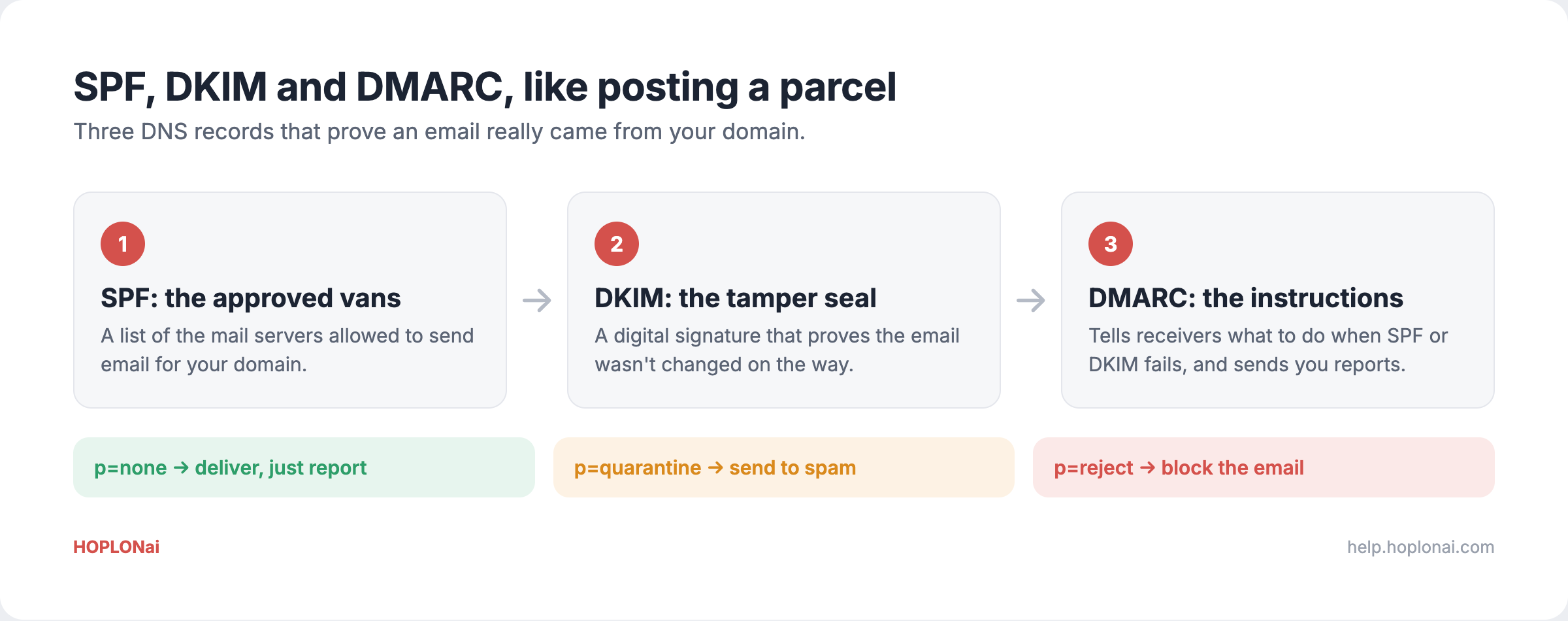
SPF, DKIM and DMARC are three records you add to your domain so that other email systems can check that an email really came from you. SPF says which servers may send your email. DKIM adds a signature to prove the email was not changed. DMARC tells receivers what to do when an email fails these checks, and sends you reports. Together, they make it much harder for attackers to send fake emails "from" your business.
Email was designed without a built-in way to prove who sent a message. Anyone can type your address into the "From" line. This is called spoofing.
Attackers spoof real businesses to:
Send fake invoices to your customers
Trick your own staff with emails that look internal
Damage your reputation
Email authentication also affects delivery. Google's sender rules require every sender to Gmail to use SPF or DKIM. Senders of large volumes (around 5,000 or more emails a day to Gmail) must use SPF, DKIM and DMARC. Even if you send far less, missing records can push your emails into spam.
All three are DNS records. DNS (Domain Name System) is the public address book of the internet. You manage it where you bought your domain or where your DNS is hosted, for example your domain registrar or a provider such as Cloudflare.
Each record is a short line of text (a "TXT record"). You do not install anything on your computers.
SPF (Sender Policy Framework) is a list of the mail servers and services allowed to send email for your domain.
When an email arrives, the receiving server checks: "Did this come from a server on the list?"
A simple SPF record for a business on Google Workspace looks like this:
v=spf1 include:_spf.google.com ~all
v=spf1 – this is an SPF record
include:... – allow this provider's servers
~all – treat everything else as suspicious
Watch out for:
Missing senders. Add every service that sends as you: your email provider, newsletter tool, CRM, invoicing app, website forms.
Only one SPF record per domain. Two records break SPF. Merge them into one.
Too many lookups. SPF allows a maximum of 10 DNS lookups. Long lists of include: entries can break it.
DKIM (DomainKeys Identified Mail) adds a hidden digital signature to each email you send.
Your email provider holds a private key and signs each message.
You publish the matching public key in DNS.
The receiver uses the public key to check the signature.
If the signature matches, the receiver knows the email came from a server that holds your key, and the signed parts were not changed on the way.
You turn DKIM on inside your email platform. Google Workspace and Microsoft 365 each give you the DNS record to publish. Use a 2048-bit key if your provider supports it. Do the same for other services that send as you, such as your newsletter tool.
DMARC (Domain-based Message Authentication, Reporting and Conformance) ties SPF and DKIM together.
It does two jobs:
Sets a policy. It tells receivers what to do with email that fails.
Sends reports. Receivers send you summaries of who is sending email using your domain.
To pass DMARC, an email must pass SPF or DKIM, and the domain that passed must match the domain in the visible "From" address. This match is called alignment. It stops attackers passing SPF with their own domain while showing yours in the From line.
A DMARC record looks like this:
v=DMARC1; p=none; rua=mailto:[email protected]
The p= part is the policy. There are three levels:
Policy | What receivers do with failing email | When to use |
|---|---|---|
| Deliver as normal, but report | Start here, to learn who sends as you |
| Send to spam or junk | Next step, once real senders pass |
| Block it | Final goal, best protection |
p=none gives you reports but no protection. Do not stay there forever.
Think of a parcel delivery:
SPF checks the van is on your approved list.
DKIM checks the seal on the box is intact.
DMARC is your instruction to the receiver: "If the van is unknown and the seal is broken, refuse the parcel, and tell me about it."
List everything that sends email as your domain. Email platform, marketing tools, CRM, helpdesk, billing, website.
Publish one SPF record that includes all of them.
Turn on DKIM in your email platform and in each sending service. Publish their DNS records.
Publish DMARC with p=none and a reporting address.
Read the reports for a few weeks. Fix any real service that fails.
Move to p=quarantine, then to p=reject when you are confident.
Protect domains you do not send from. Publish an SPF record of v=spf1 -all and a DMARC record with p=reject, so attackers cannot use them.
Re-check after any change, such as a new email tool.
Yes, for good protection. SPF and DKIM prove where an email came from. DMARC turns those checks into a clear instruction and gives you reports.
No. DMARC stops attackers using your exact domain. It does not stop lookalike domains (for example yourc0mpany.com) or emails from real accounts that were hacked. You still need email filtering and staff training. See how to stop phishing emails in a small business.
A p=none policy will not block anything. Problems happen if you jump to p=reject before every real sender passes. Move step by step.
Use a free checker, such as the UK NCSC's Check your email security tool, or the tools from your email provider.
An XML file sent by receiving mail servers. It lists which servers sent email using your domain and whether they passed. A DMARC reporting tool turns these files into readable charts.
HOPLONai's Email Security module includes a DNS Authentication card. It shows whether SPF, DKIM and DMARC are published for each of your mail domains, with details for each record. If your business uses more than one mail domain, you can switch between them.
Email Security also scans incoming email for phishing, business email compromise and malware. It is part of the Premium package.
Learn more:
