Cyber Essentials is a UK government-backed certification that shows your business has five basic controls in place against the most common cyber attacks. The HOPLONai Cyber Essentials Toolkit turns the official IASME questions into a checklist, so you can collect evidence and close gaps before you apply. It is included for every HOPLONai customer.
Cyber Essentials is often the first security certificate a UK small business needs. This guide explains what it is, how it differs from Cyber Essentials Plus, who needs it, and how to use the toolkit step by step.
Important: HOPLONai helps you prepare. It does not award Cyber Essentials. Your certificate comes from a certification body licensed by IASME, the scheme's official delivery partner.
Cyber Essentials is a UK government-backed scheme. It shows that your business has basic protections against the most common cyber attacks. The NCSC (the UK's National Cyber Security Centre) sets the technical rules. IASME runs the scheme and writes the question set.
The scheme checks five technical controls. The current rules are the NCSC's Requirements for IT Infrastructure v3.3, in force since 27 April 2026:
Firewalls: a firewall is a filter between your devices and the internet. It blocks traffic you did not ask for.
Secure configuration: change default passwords, remove software you don't use, and turn off settings that aren't needed.
Security update management: install updates (also called patches) quickly. Patches fix security holes. Updates for "critical" or "high risk" vulnerabilities (a CVSS score of 7 or more) must be installed within 14 days of release. All software must be licensed and supported.
User access control: give people only the access they need, and use MFA (multi-factor authentication: a second check, like a code on your phone) wherever it is available. If a cloud service offers MFA, even as a paid extra, you must turn it on. Leaving it off is an automatic fail. Use separate accounts for admin work.
Malware protection: stop harmful software, such as viruses and ransomware, with anti-malware tools or app allow-lists.
Cloud services that hold your data or run your services, such as Microsoft 365 or Google Workspace, are always in scope. You can't leave them out.
Cyber Essentials | Cyber Essentials Plus | |
|---|---|---|
How it's checked | A self-assessment: you answer an online question set | The same five controls, plus a hands-on technical test of a sample of your devices and accounts |
Who checks it | A certification body reviews your answers | An assessor from a certification body tests your systems |
Cost | From £320 + VAT, depending on the size of your organisation | Quoted by your certification body, based on the size and complexity of your network |
How long it lasts | 12 months, then you renew | 12 months, then you renew |
In HOPLONai | Cyber Essentials tab, included for every customer | Cyber Essentials Plus tab, with Premium |
Prices are set by IASME and the certification bodies, and can change. Check the current fee before you apply.
You probably need Cyber Essentials if:
You bid for UK government contracts. Many require it.
A customer, partner or insurer asks for it.
It is a good first step before ISO 27001 or SOC 2.
The Cyber Essentials Toolkit is included for every HOPLONai customer. It gives you:
The Cyber Essentials questions, taken from the official IASME question set. They are grouped into eight themes, from A1 Your Company to A8 Malware Protection.
An Answer field for pass/fail questions. It tells you straight away if an answer does not meet the requirement.
An evidence checklist for each question, so you collect proof as you go.
A live Total Readiness score and a list of gaps.
With Premium: the Cyber Essentials Plus tests, and the HOPLONai Mapping. The mapping shows which HOPLONai modules help with each question, such as Endpoint Security, MDM or Security Policies.
In the left sidebar, go to Compliance > Cyber Essentials Toolkit.
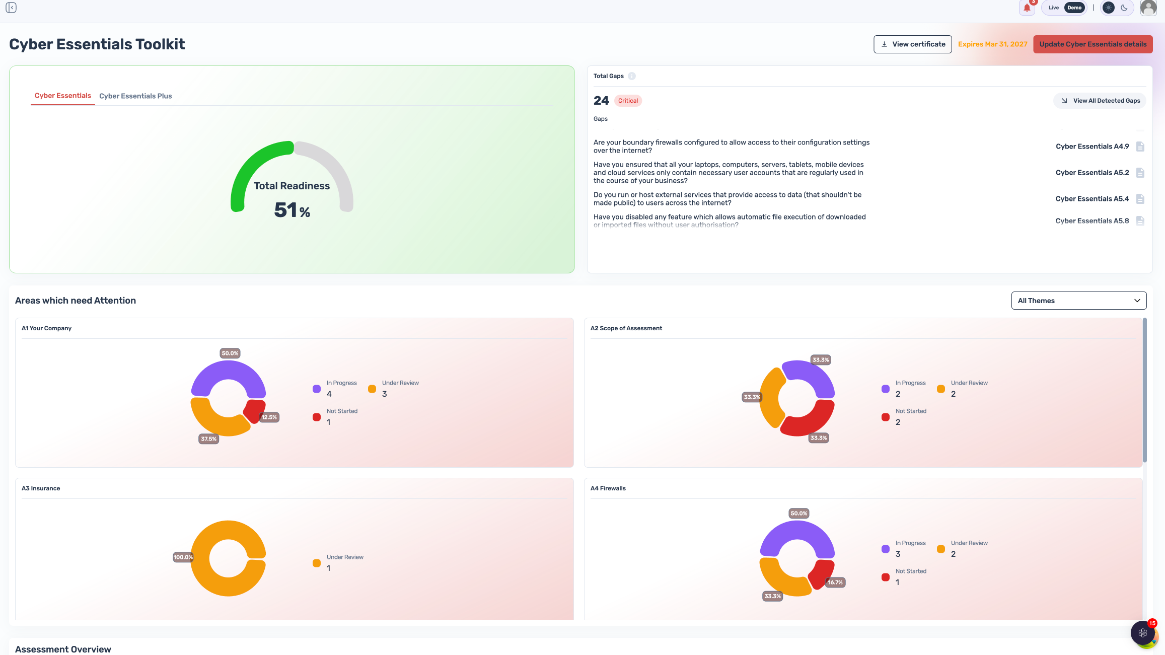
Total Readiness shows the percentage of questions marked Audit Ready. Questions marked Not Applicable (N/A) are left out. Use the switch to see Cyber Essentials or Cyber Essentials Plus (Premium).
Total Gaps shows how many items still need work. Click View All Detected Gaps to filter the list below to gaps only.
In Areas which need Attention, choose a theme, for example A4 Firewalls. The charts show open items by status, and the Assessment Overview list filters to that theme.
In Assessment Overview, stay on the Cyber Essentials tab. Use Search... to find a question by ID (for example A4.1) or by words. Click a question to open it. You will see four panels:
Description: the question, IASME's guidance, and chips such as Expected (the answer that passes) and Answer type. Some questions are marked Informational. They are not pass/fail.
Required Policies / Controls / Evidences: the evidence checklist.
HOPLONai Mapping: the modules that help (Premium).
Control Status: the Answer, Status and Notes.
Record your answer in panel 4:
For Yes/No or multiple-choice questions, use the Answer field. If your answer does not meet the requirement, you'll see a red message with the expected answer.
For free-text questions, write your answer in Notes and click Save.
Some questions only apply because of an earlier answer. When you answer the earlier question, the toolkit sets these follow-up questions to N/A (or back to Not Started) for you.
In panel 2, click Add Evidence next to an item, or click Add Evidence / Document.
If asked, choose what the evidence Applies to.
Choose Upload file (PDF, DOCX, XLSX, PNG or JPG, up to 50 MB) or Add link.
Click Upload or Add link.
The item gets a green tick. Adding the first evidence moves a Not Started question to In Progress by itself.
Choose a Status: Not Started, In Progress, Under Review, Audit Ready or Not Applicable (N/A).
The toolkit only lets you choose Audit Ready when:
every evidence item has a file or link,
the answer is recorded (or Notes are filled in for free-text questions), and
the answer meets the requirement.
If something is missing, a message tells you what to fix.
Open the Cyber Essentials Plus tab. Each test shows the Test Purpose, Applies To, Assessor Steps, Pass Criteria, Fail Criteria and Linked Requirements. Use it to run your own checks before the assessor does.
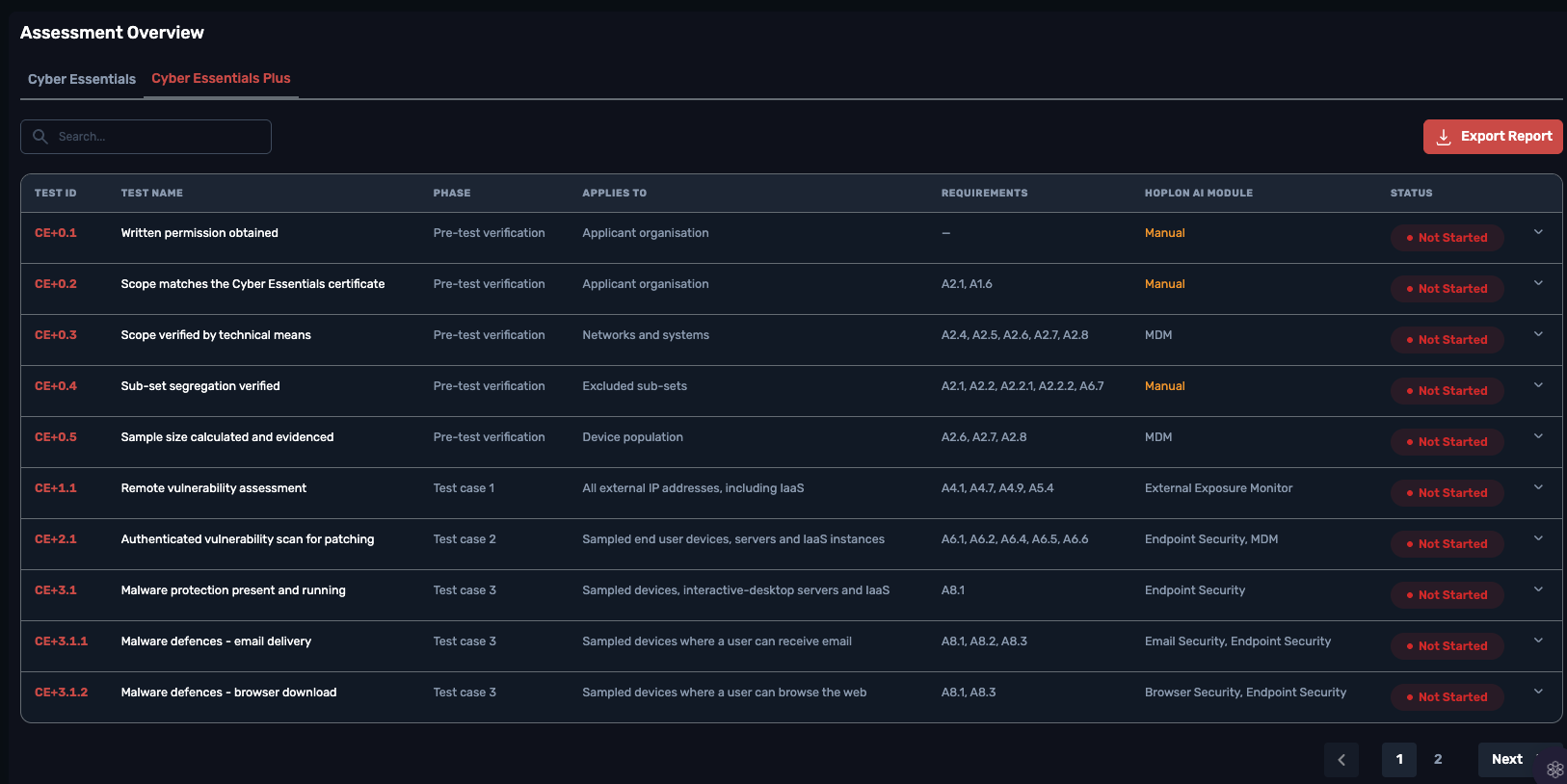
Click Export Report to download an Excel file of the current tab. Use it as your working copy when you fill in the official question set with your certification body. HOPLONai does not submit your application for you.
When you are certified, your company admin can click Add Cyber Essentials details at the top right. Add the Expiry date and upload the certificate. The page then shows View certificate and the expiry date, so you know when to renew.
No. A certification body licensed by IASME reviews your application and issues the certificate. HOPLONai helps you get your answers and evidence ready first.
Yes. It is included for every HOPLONai customer. The Cyber Essentials Plus tab and the HOPLONai Mapping need the Premium package.
The toolkit uses IASME’s Danzell question set, version 16.3. The questions come from the official IASME question set. IASME updates the question set from time to time. Always check your answers against the latest version from your certification body.
Cyber Essentials Plus adds a hands-on technical test of your devices by an assessor. See the comparison table above.
The basic certification starts at £320 + VAT and depends on the size of your organisation. Cyber Essentials Plus is quoted by your certification body. Check the current fee before you apply.
Yes. Since 27 April 2026 (requirements v3.3), if a cloud service offers MFA, even as a paid extra, you must turn it on. Leaving it off is an automatic fail. Cloud services that hold your data can't be left out of scope.
One of three things is missing: evidence for every checklist item, a recorded answer, or an answer that meets the requirement. The message under the status tells you which one.
12 months. Add the expiry date in the toolkit so you can see when to renew.
