The MDM module gives admins a single view of every device enrolled in Mobile Device Management (MDM), tracking enrollment, compliance, and the security controls that should be running on each one. It correlates MDM enrollment status with other Hoplon modules — Endpoint Security (EDR) and Browser Security — so gaps like "enrolled but missing an agent" surface automatically instead of requiring a manual cross-check between systems.

The Fleet Overview sits at the top of the MDM dashboard and gives a snapshot of the whole device population in four tiles:
Devices Reporting to Hoplon — the total number of devices sending data into Hoplon from EDR module , whether or not they're enrolled in MDM.
Enrolled in Swif MDM — how many of those devices are enrolled in the organization's MDM provider, shown with the percentage of the reporting fleet that represents.
Compliant — how many enrolled devices currently meet every policy check tracked by the module (disk encryption, screen lock, OS currency, firewall). A device with even one failing check is not counted here.
Unmanaged / Not Enrolled — devices reporting to Hoplon that are not enrolled in MDM at all, flagged as "Needs action" since they sit outside policy enforcement entirely.
Together these four numbers answer the first question an admin has: how much of the fleet is under management, and how much of that is actually compliant.
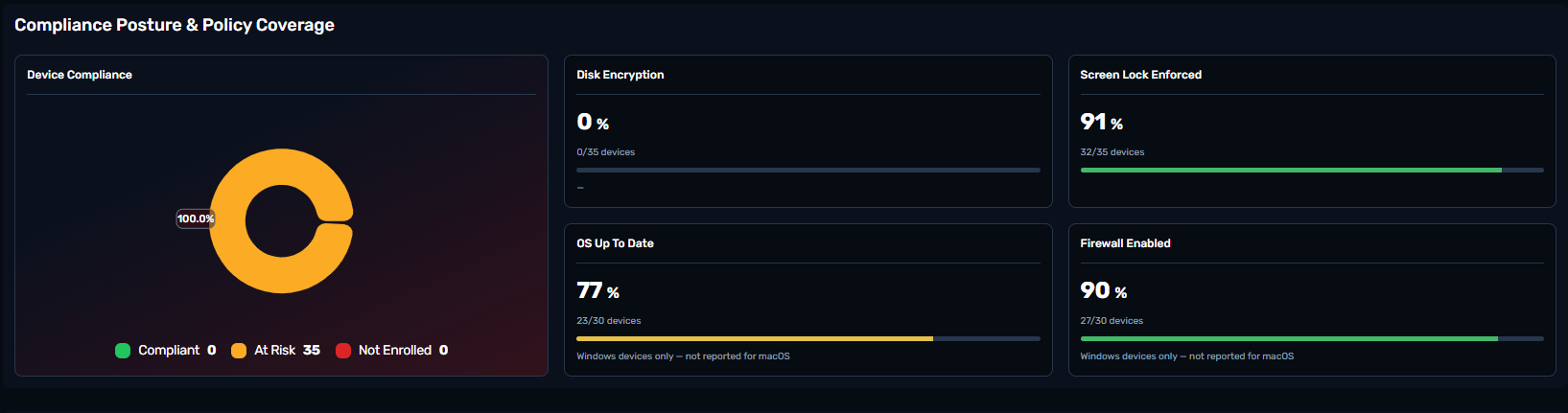
This section breaks down why a device is or isn't compliant.
The Device Compliance donut splits enrolled devices into Compliant, At Risk, and Not Enrolled, so admins can see the overall health of the managed fleet at a glance.
Four policy tiles then show coverage for the individual checks that make up compliance:
Disk Encryption — the share of managed devices with disk encryption actively turned on.
Screen Lock Enforced — the share with a screen lock policy in effect.
OS Up To Date — the share running a current, supported OS version.
Firewall Enabled — the share with their firewall turned on.
Note on current coverage: OS Up To Date and Firewall Enabled are currently reported for Windows devices only — macOS devices aren't included in those two percentages yet, which is why their device counts are smaller than the full enrolled fleet.
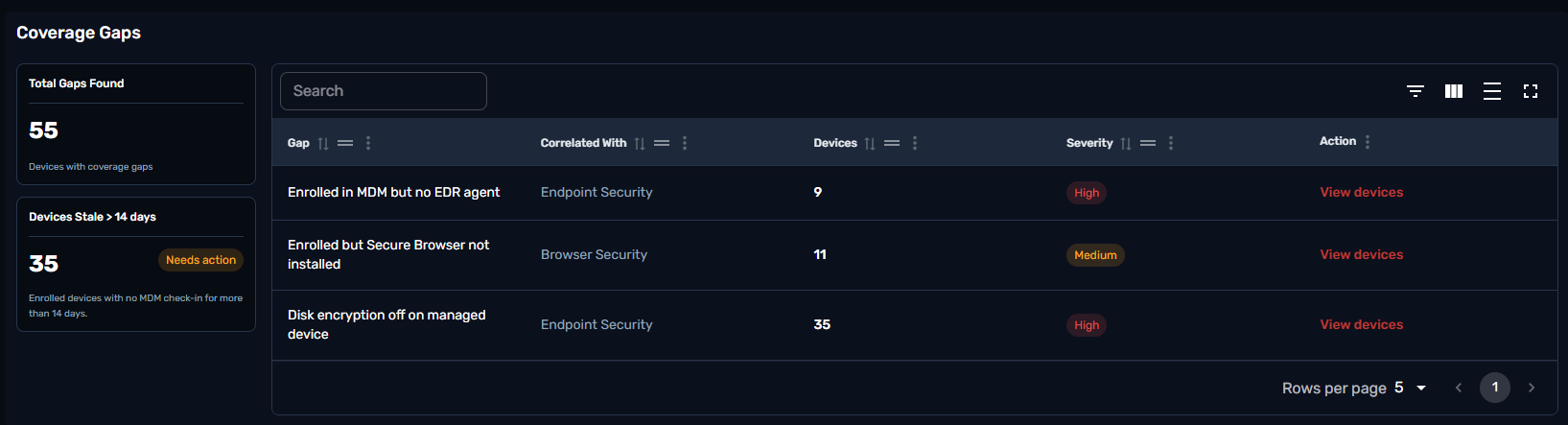
Where Fleet Overview and Compliance Posture summarize the fleet, Coverage Gaps lists the specific, actionable problems behind those numbers.
Total Gaps Found counts every device sitting in at least one gap category. Devices Stale > 14 days is a separate freshness check .
The gap table itself cross-references MDM enrollment against other Hoplon modules to surface coverage holes a single dashboard wouldn't catch on its own:
Enrolled in MDM but no EDR agent (correlated with Endpoint Security) — devices under MDM management with no endpoint detection and response agent installed.
Enrolled but Secure Browser not installed (correlated with Browser Security) — devices under MDM management without the secure browser agent.
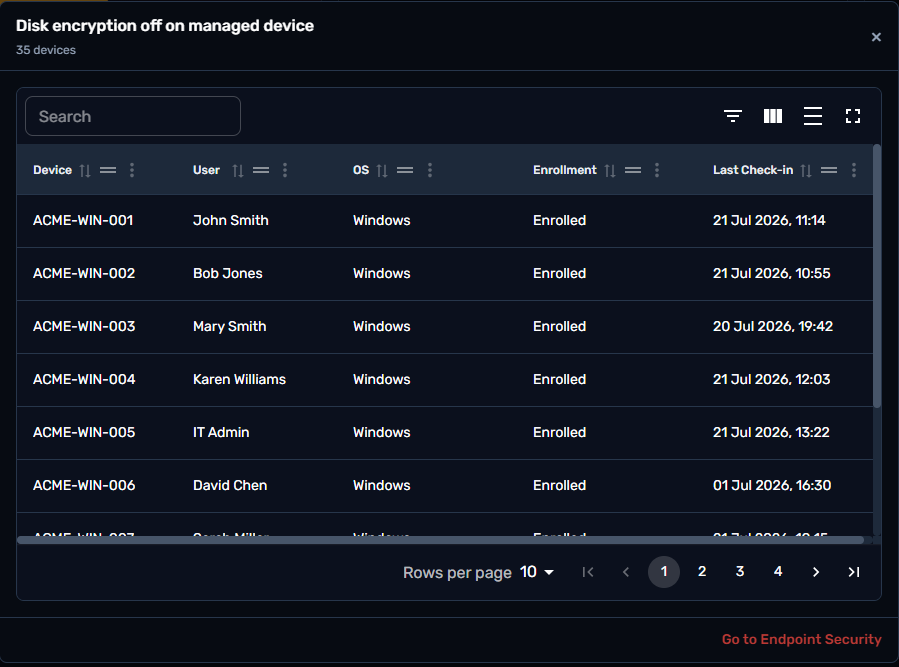
Disk encryption off on managed device (correlated with MDM Logs) — managed devices where encryption isn't active.
Each row shows the number of affected devices and a severity rating, and "View devices" opens the underlying device list for that specific gap.
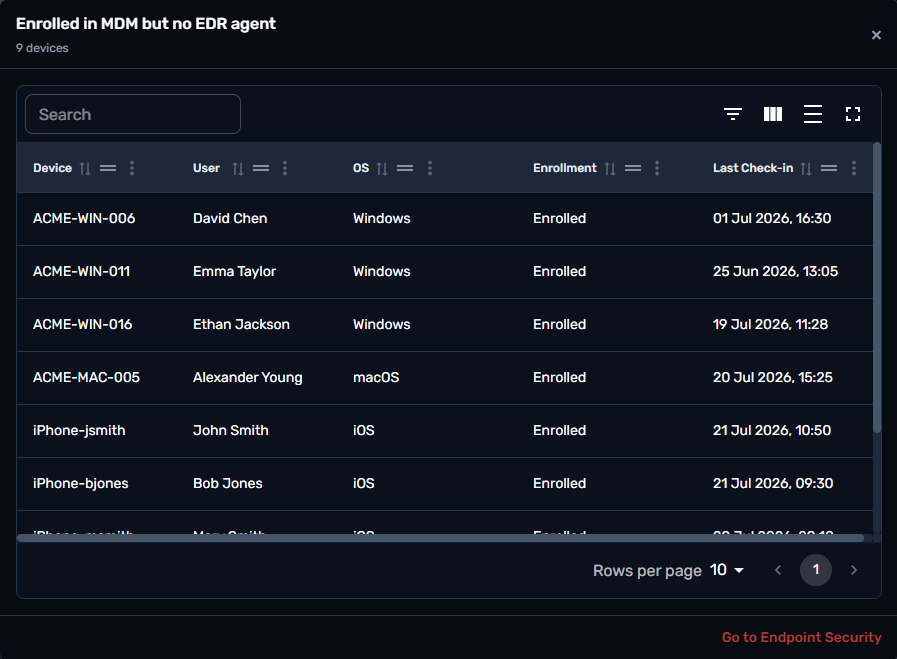
Clicking "View devices" on this gap opens a device-level list of everyone missing an EDR agent despite being MDM-enrolled: Device, User, OS, Enrollment status, and Last Check-in. A "Go to Endpoint Security" link jumps straight to that module so the admin can confirm the finding and start remediation without leaving the flow.
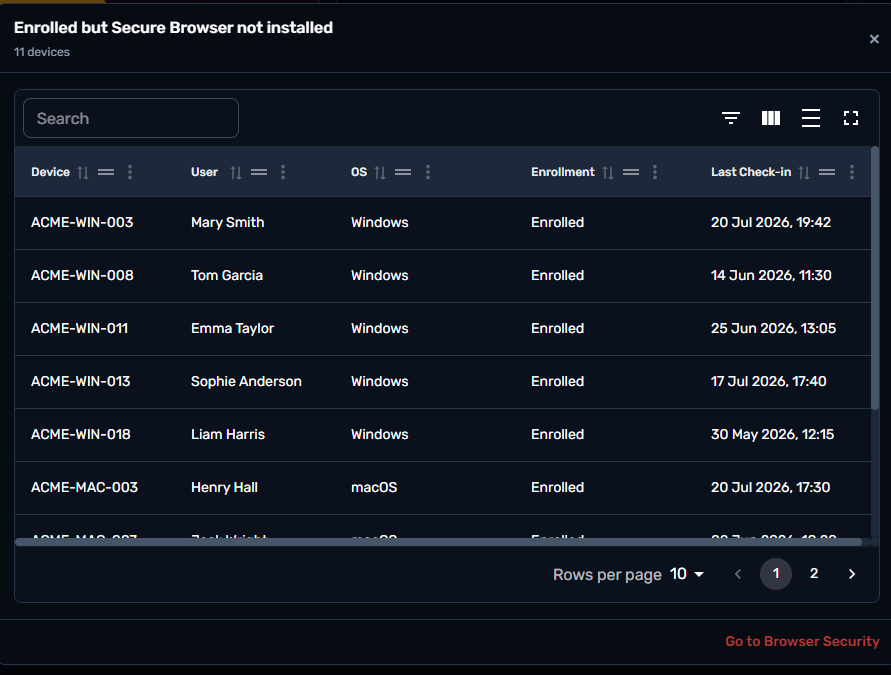
Same drill-down pattern, for devices missing the secure browser agent: Device, User, OS, Enrollment status, and Last Check-in, with a "Go to Browser Security" link to follow up in that module.
The largest of the three gap lists, showing every managed device without active disk encryption — Device, User, OS, Enrollment status, and Last Check-in . Because this list can span many devices, it paginates rather than showing everything at once.
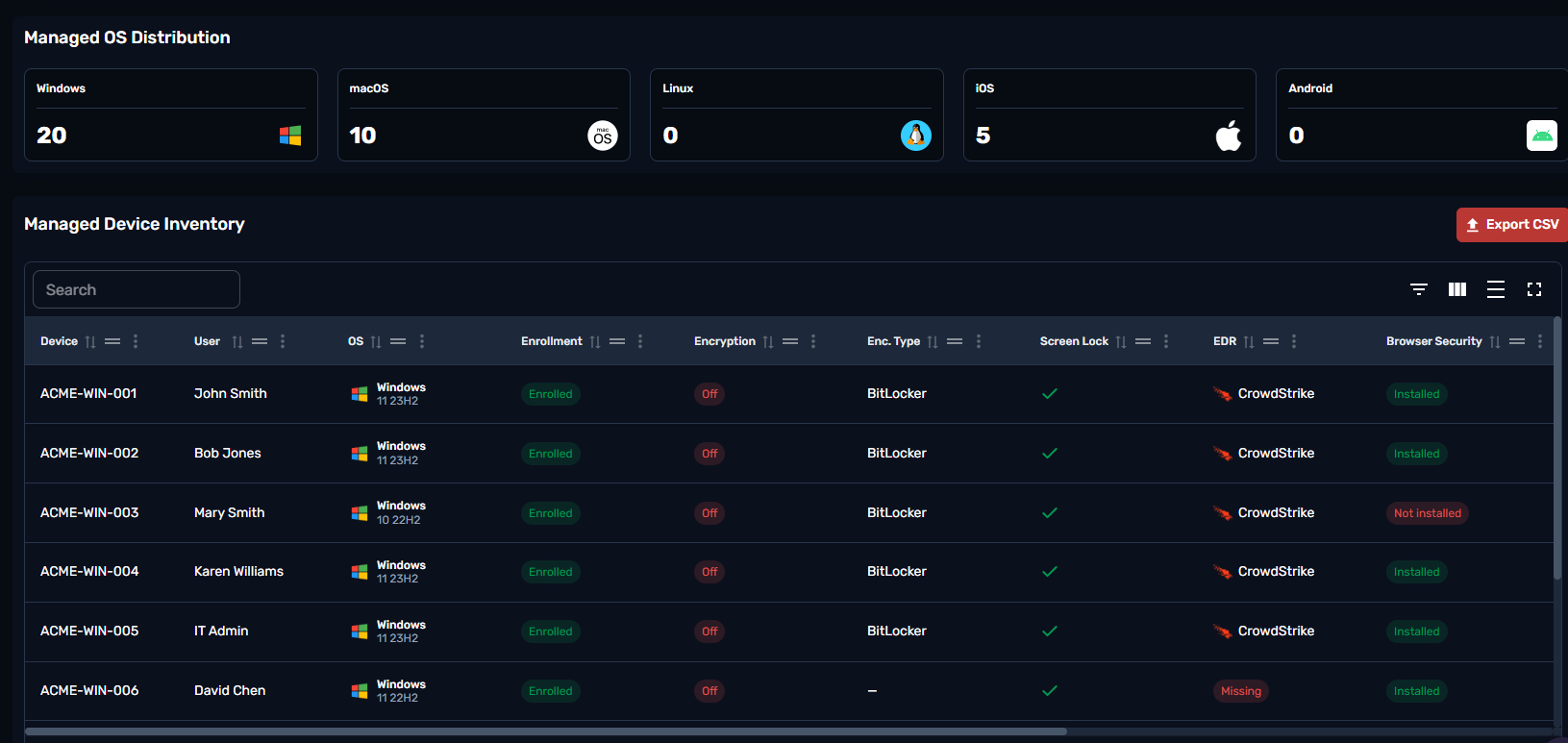
Managed OS Distribution shows how the enrolled fleet splits across Windows, macOS, Linux, iOS, and Android — useful context for reading the policy tiles above, since not every check applies equally to every platform.
The Managed Device Inventory table is the full, searchable device list behind every summary metric on the page: Device name, User, OS (with version), Enrollment status, Encryption on/off, Encryption type (e.g. BitLocker), Screen Lock, EDR agent, and Browser Security status. It supports filtering, column customization, and full-screen view, and can be exported to CSV for offline reporting or sharing outside Hoplon.
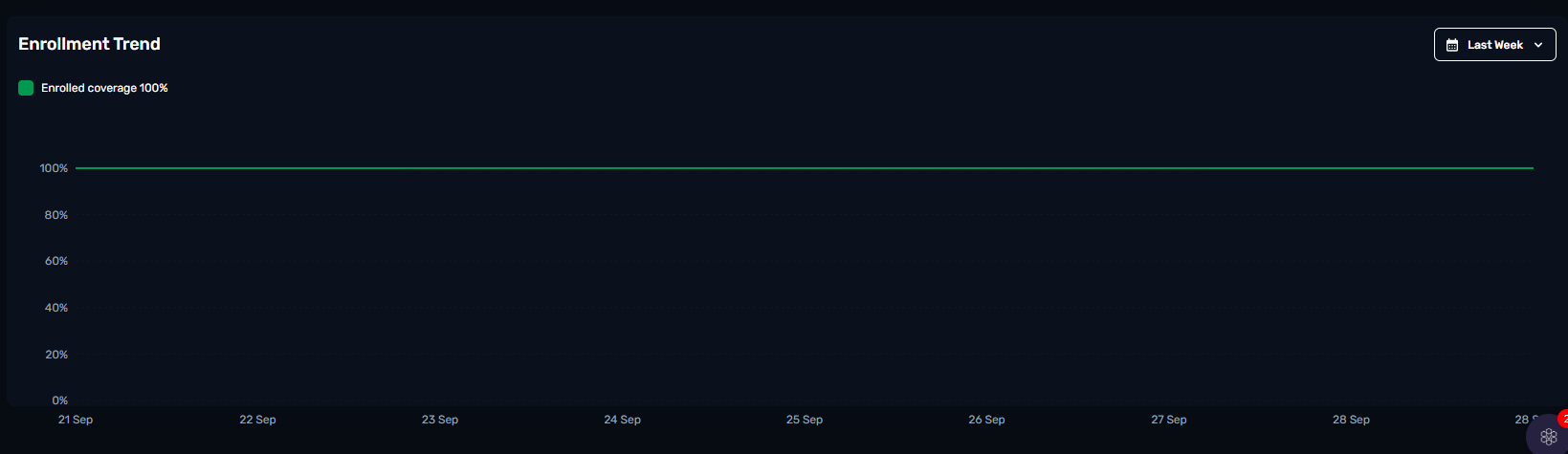
A line chart tracking enrolled coverage (the share of reporting devices enrolled in MDM) over a selectable window — Last Week by default, with other ranges available from the dropdown. It's the quickest way to confirm enrollment is holding steady or catch a drop right after it happens, rather than only noticing it in a point-in-time snapshot.
